Your WordPress site, in good hands.
Tell us what needs improving. We can help with speed, maintenance, fixes, and new websites.

Your WordPress site, in good hands.
Your WordPress site, in good hands.
VendBase is a WooCommerce admin replacement built for store operations. It keeps WooCommerce as the system of record but replaces the default backend experience with a faster interface for orders, customers, products, subscriptions, analytics and fulfillment.
Updated September 2026: VendBase has changed substantially since our original review. Version 1.1.0, released in March 2026, introduced a completely rebuilt dashboard, custom detail views, a configurable reports engine, custom order columns and new integrations. The latest published changelog entry is version 1.1.1 from May 22, 2026.
VendBase does not replace WooCommerce itself. Your checkout, products, orders, customers and database remain WooCommerce. VendBase replaces the administration layer used by store managers and support teams.
That distinction is important because it means you are not moving commerce data into a second system. VendBase is a workflow layer on top of the same WooCommerce store.
VendBase was originally called WooBase and was renamed in 2024. Existing licenses and the plugin continued under the new brand.
One of VendBase’s strongest features remains global search. Instead of navigating through separate WooCommerce screens, you can search across orders, products, customers and coupons from one interface.
The current command hub also supports keyboard navigation and quick actions, which is useful for staff processing a high volume of support or fulfillment work.

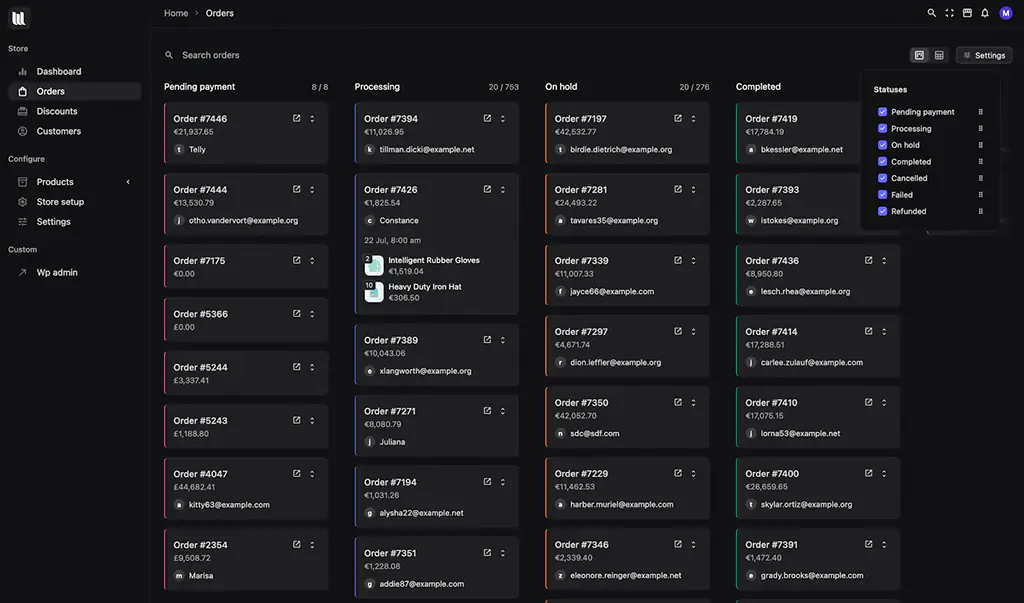
VendBase turns WooCommerce order statuses into a visual Kanban workflow. Orders appear as cards and can be moved between columns that match the store’s fulfillment process.
The important detail is that these are still normal WooCommerce orders. Moving an order between columns changes the underlying WooCommerce status rather than creating a separate proprietary workflow database.
Custom order statuses can also be used, which makes the board useful for stores with workflows such as packing, awaiting stock, quality control or custom production.
VendBase 1.1.0 rebuilt the dashboard around configurable cards and a 12-column drag-and-drop layout. Current cards include total sales, net sales, order count, products sold, average order value and refunds, plus low-stock alerts, recent reviews and order-status summaries.
The reporting system is much more advanced than it was when we first reviewed VendBase. Version 1.1.0 introduced built-in report types for orders, inventory, products, customers and revenue, with customizable filters, columns and charts.
CSV exports now retrieve the complete result set rather than only the visible page, and a no-code report builder can create custom reports from presets and metric selections.
The 2026 detail-view builder lets store owners or agencies create custom panels for orders, products, categories, discounts, subscriptions, reviews, shipping zones and brands.
Core WooCommerce fields and metadata can be exposed and organized into custom sections, which is especially useful for stores that depend on ACF, custom order metadata or operational data added by third-party plugins.
VendBase can run inside the normal WordPress admin or be mounted on a frontend page for authenticated staff. This can be useful when warehouse or support staff need orders, customers and products but should not have to navigate the rest of wp-admin.
WordPress authentication and capabilities still control access; frontend mode changes the workspace, not the permission model.
VendBase has expanded compatibility beyond standard WooCommerce data. Current releases include ACF-aware workflows, JetEngine support, WooCommerce Brands, WooCommerce Germanized and awareness of several SEO and marketing plugins.
The custom field and custom column systems make it easier to surface metadata from specialized store plugins inside the operational interface.
VendBase is built around a single-page application style interface, optimized queries and caching, so many common store-management actions require fewer full WordPress page loads.
The VendBase website currently advertises major admin performance improvements and roughly two seconds saved per page load in its own measurements. We would treat those figures as vendor benchmarks rather than a universal guarantee.
Real admin speed still depends on hosting, database size, order volume, object caching and the rest of the WooCommerce plugin stack.

VendBase is currently still selling lifetime licenses as one-time purchases. The site states that lifetime pricing is an early-adopter offer before an eventual move to yearly licensing.
Every plan currently includes the full feature set, lifetime updates, priority support and white labeling. The plans differ mainly by activation count. A 14-day money-back period is advertised.
Because the current pricing is explicitly promotional and the vendor says yearly licensing is planned later, check the official VendBase pricing before purchasing.
Need help maintaining a busy WooCommerce site? See our WordPress Maintenance service. Suitable premium licenses may be included from our available subscriptions when applicable.
VendBase has matured into a much more complete WooCommerce operations interface in 2026. The biggest improvement since our original review is not cosmetic. The dashboard, report builder, custom views, custom columns and integration work make it more useful for stores with real operational complexity.
The strongest use case is a store where several people spend meaningful time every day inside WooCommerce. In that environment, reducing page loads, simplifying search and turning fulfillment into a visual workflow can save real staff time.
For a small store with occasional orders, VendBase may be more interface than you need. For high-volume WooCommerce operations or agencies handing stores to non-technical staff, it is far easier to justify.