
Creating online courses with LearnDash
LearnDash 4.1 promised to streamline the process of creating online courses—and it delivered. Thanks to the new “Course Creation Wizard”, users can now generate lessons directly from playlists on YouTube, Vimeo, or Wistia. In this article, we dive into this feature and explore other exciting updates to this popular WordPress plugin.
From Playlists to Online Lessons
If you already have video content hosted on a popular platform (think YouTube, Vimeo, or Wistia), LearnDash 4.1 makes it easy to turn that content into lessons with just a couple of clicks. The Course Creation Wizard enables users to create courses directly from playlists—simply copy and paste the playlist link into the wizard, and you’re good to go. With this tool, courses can be up and running in seconds.
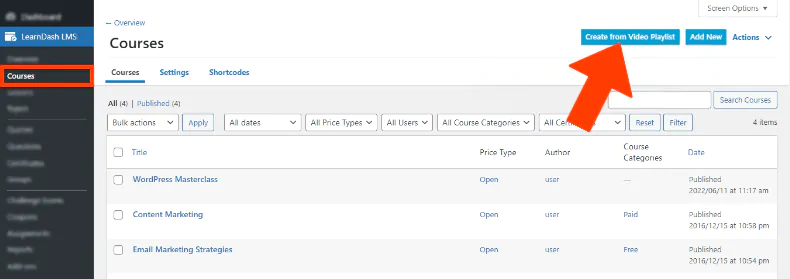
As shown in the screenshot above, you’ll see how LearnDash loads your playlist and uses it to create a course in the familiar format. You can then edit and tweak the course to your liking if needed.
Enhanced Coupon Management
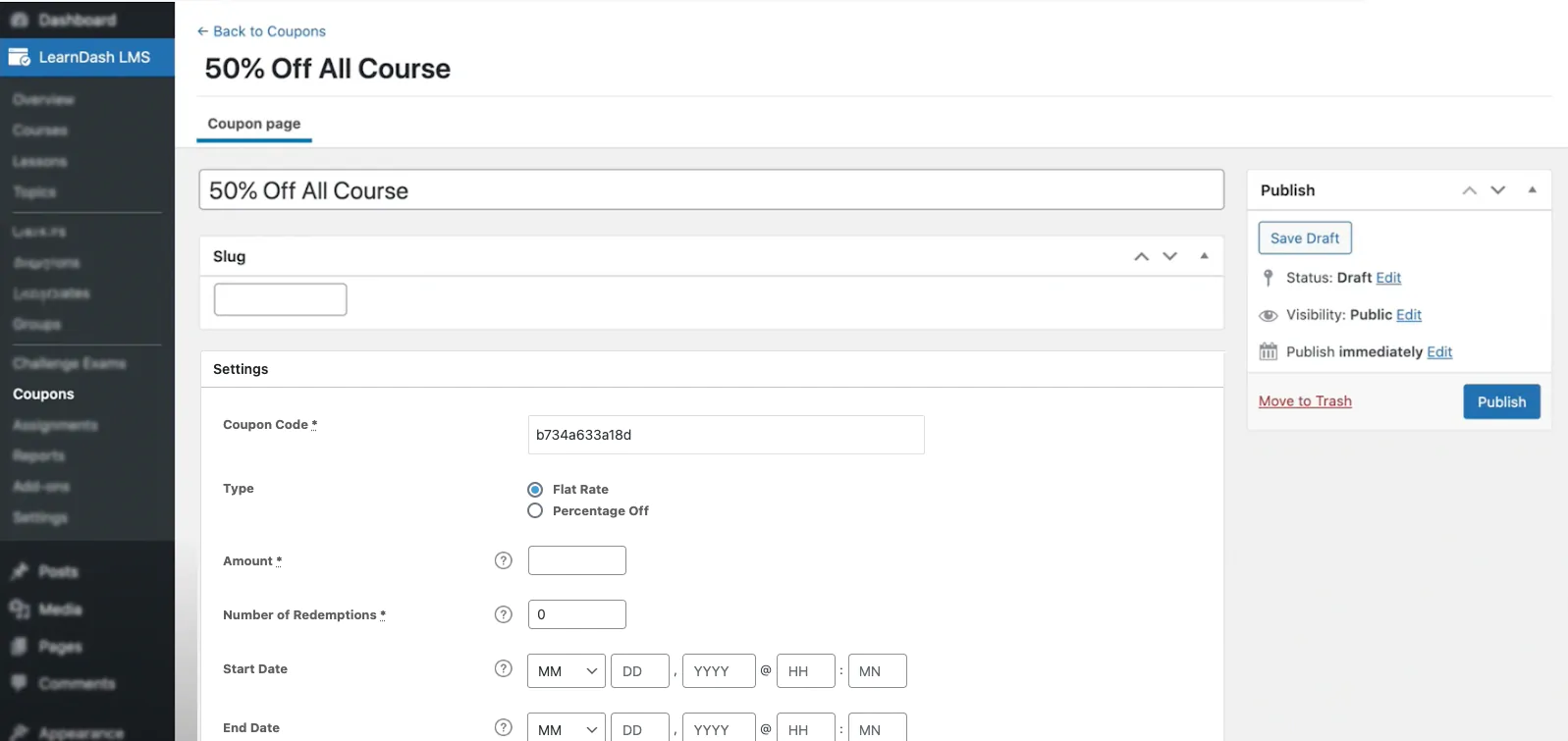
One of the key improvements in LearnDash 4.1 is the dramatically simplified process of creating coupons. Version 4.1 introduced robust support for discount coupons, including flat-rate and percentage-based discounts, natively integrated into the platform. This update provides greater control over how courses are marketed and sold, eliminating the need for third-party add-ons. Selling bigger numbers through coupon-driven marketing is now easier than ever.
Keeping Learning on Track with the “Mark as Incomplete” Feature
To help learners track their progress, LearnDash 4.1 introduces the “Mark as Incomplete” feature. This functionality allows users to easily identify and separate completed lessons from those still in progress. It’s an excellent way to keep students engaged and aware of their advancement throughout the course.
GDPR Data Export/Deletion Sets for a Cleaner Browsing Experience
LearnDash includes tools to export or delete user data stored by the plugin. These tools help manage information and related user requests.
Those tools alone do not establish that a website complies with data-protection requirements; configuration and how information is handled also matter.
Focus on Focus
LearnDash 4.1 also enhances options for keeping learners focused. The new “Focus Mode” allows users to customize the position of the sidebar, moving it to the left or right as preferred.
Additional Improvements
Beyond security and speed enhancements, LearnDash 4.1 introduces several optimizations:
- Updated Assignments: Assignments now open in the WordPress admin area for improved usability.
- Quiz Enhancements: Fixed carriage returns and added JSON analysis options for quiz submissions.
- Course ID Fixes: Resolved an issue where the course ID in
ajaxQuizLoadDatawould sometimes appear blank. - Quiz Save & Resume: Minor bugs with the save and resume functionality in quizzes have been addressed.
- PayPal Transaction Fix: Corrected an issue where the “PayPal Transaction” report tab displayed as a draft if the IPN response was not returned.
- Course Navigation Fix: Resolved an issue where course navigation was not displaying for open courses.
Need help building your online academy?
We build learning platforms with Moodle and LearnDash, with the scope agreed around your project.