
Perfmatters is a lightweight WordPress performance plugin focused on reducing unnecessary frontend work: disabling scripts and features you do not need, removing unused CSS, delaying JavaScript, optimizing fonts and analytics, lazy loading media, cleaning the database and controlling where plugins/assets run.
Updated September 2026: Perfmatters is now at version 2.6.8. The product has expanded beyond its original toggle-based optimizations with Remove Unused CSS, Speculative Loading controls, a high-performance code-snippet system, Safe Mode and deeper per-page asset management.

Perfmatters in 2026: what changed?
- Version 2.6.8: released September 9, 2026.
- Safe Mode: disables Perfmatters performance optimizations sitewide for troubleshooting without turning off security-related options or code snippets.
- Code snippets: PHP, CSS, JavaScript and HTML snippets can now be managed directly inside Perfmatters using a flat-file system.
- More advanced CSS control: Remove Unused CSS now supports additional inlining and delayed stylesheet workflows.
- Speculative Loading: Perfmatters can control WordPress core’s Speculation Rules behavior to use prefetch or more aggressive prerendering.
- Continued security hardening: 2026 releases added capability checks, domain validation, output sanitization and other security improvements around snippets, fonts and admin actions.
What does Perfmatters actually do?
Perfmatters is not primarily a page-cache plugin. Its role is to reduce frontend overhead and give you granular control over the code WordPress, your theme and your plugins load.
That distinction matters. On a LiteSpeed server, for example, the Perfmatters developers recommend using LiteSpeed Cache for server/page caching while allowing Perfmatters to handle frontend code optimization. On other hosts, Perfmatters can work alongside a host-level cache or a caching plugin such as WP Rocket, WP Fastest Cache or Super Page Cache.
In practice, Perfmatters is strongest as the optimization layer that sits beside your cache, not as a replacement for caching.
Script Manager: load plugins only where they are needed
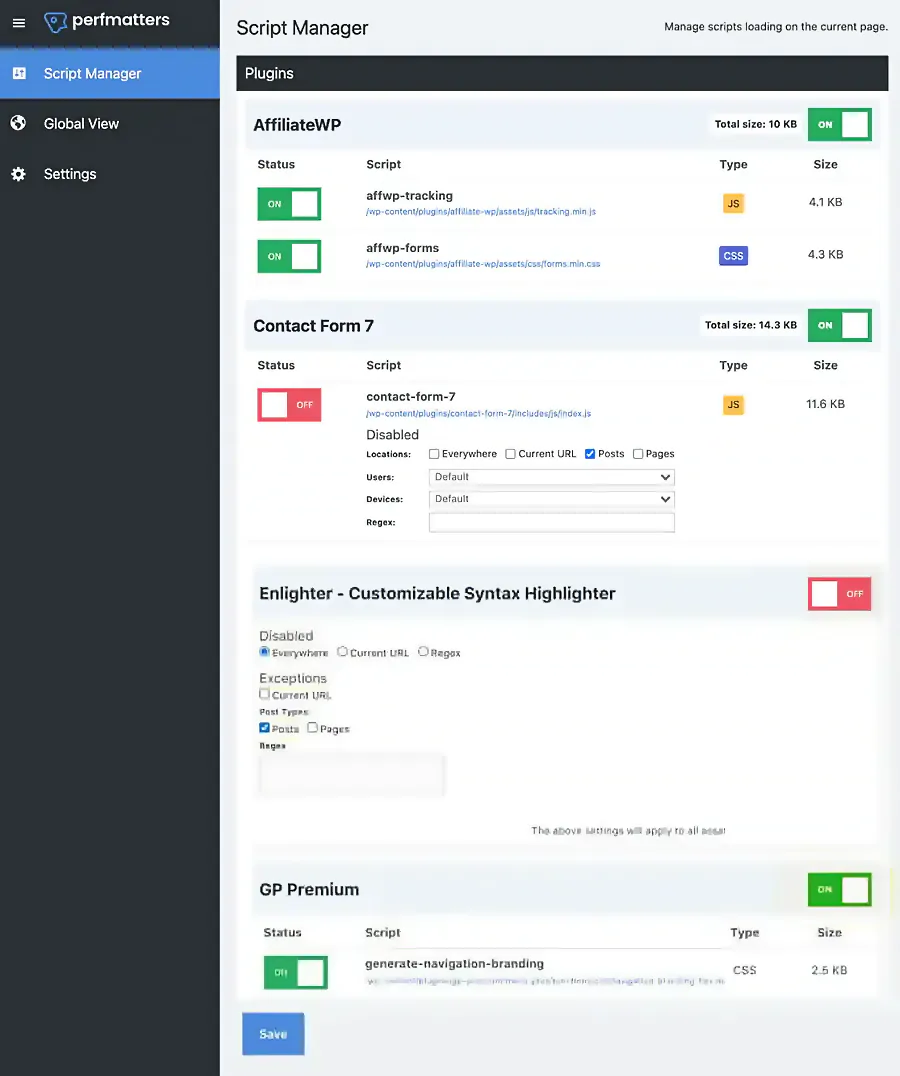
The Script Manager remains one of the best reasons to use Perfmatters. Many WordPress plugins load CSS or JavaScript globally even when their functionality appears on only one page.
With Script Manager you can disable assets sitewide, by post type, on individual pages or under specific conditions. A contact-form plugin, for example, may only need its frontend assets on the contact page. A WooCommerce extension may only need to run on shop, cart or checkout templates.
This is often a cleaner optimization than trying to minify or delay code that did not need to load in the first place.
Remove Unused CSS
Perfmatters can automatically determine which CSS a page actually uses and reduce the rest. This directly targets the “Reduce unused CSS” and render-blocking warnings commonly reported by PageSpeed Insights.
You can output the resulting used CSS inline or as a separate cacheable file. Original stylesheets can then be delayed, loaded asynchronously or removed entirely.
The aggressive “remove” mode is not something we would enable blindly. Dynamic themes, page builders, popups and ecommerce interfaces may require exclusions. The safer workflow is to enable the feature on staging, test important templates, then add exclusions only where needed.
Delay and defer JavaScript
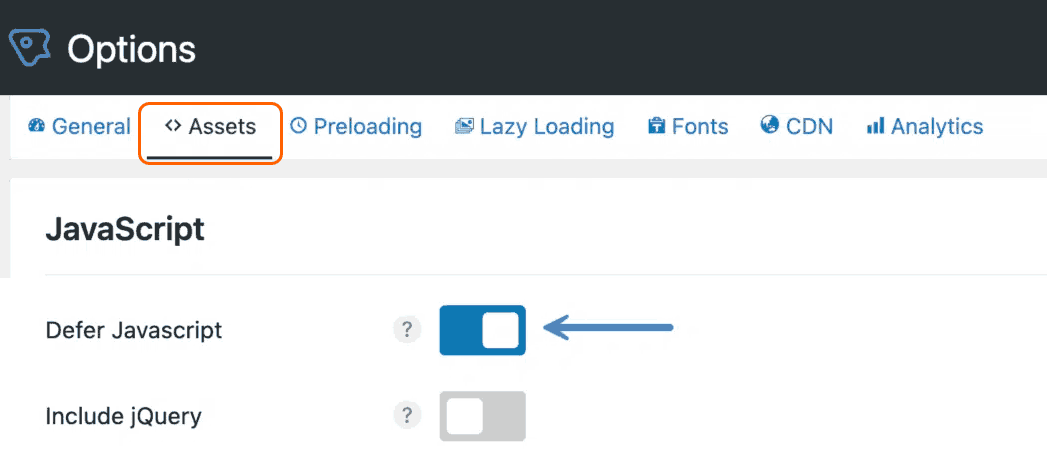
Heavy third-party JavaScript is one of the most common causes of poor Total Blocking Time and delayed rendering. Perfmatters can defer JavaScript or delay it until user interaction.
Typical candidates include analytics, advertising, tracking pixels, chat widgets and other scripts that are not required to render the initial page.
Delay JS can improve the initial loading experience, but it should be tested carefully. Search, menus, sliders, cookie banners, checkout tools and other interactive elements may need exclusions if they must work before the first user interaction.
WooCommerce optimizations
Perfmatters includes several optimizations specifically useful on WooCommerce sites, but we would avoid the old blanket advice of “disable cart fragments everywhere.”
The current cart-fragment feature checks whether the WooCommerce cart cookie exists. If the cart is empty, the cart-fragments script can be disabled; when there is something in the cart, functionality is retained. If that still conflicts with the theme, delaying the cart-fragments script until interaction is another option.
This is a better approach than indiscriminately removing WooCommerce AJAX behavior and potentially breaking mini-cart totals or cart updates.
Lazy loading images, iframes and video
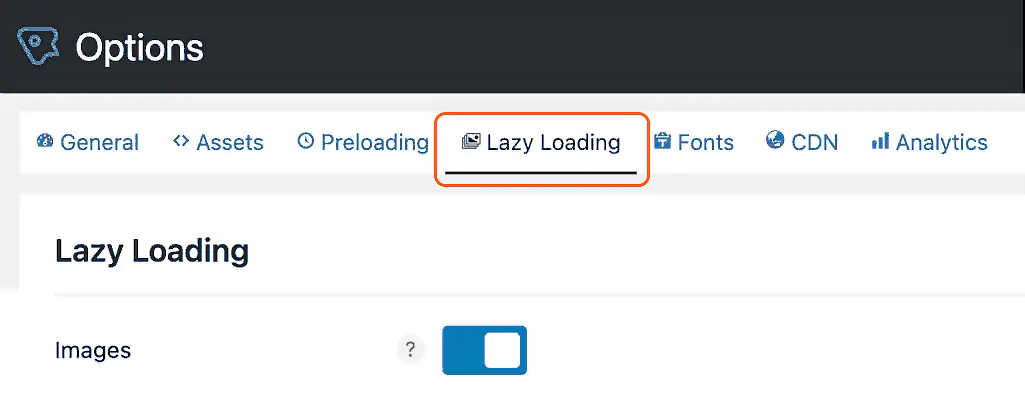
Perfmatters can lazy load images, background images, iframes and videos. It can also replace YouTube iframes with preview thumbnails so the full player loads only when the visitor clicks.
WordPress already includes native lazy loading, so the value here is not that Perfmatters always “beats” WordPress. The value is the additional control: exclusions, background-image handling, YouTube previews, DOM monitoring and integration with the rest of the plugin’s optimization stack.
Our previous article quoted a universal 33% improvement from lazy loading. That is not a useful promise. The real benefit varies dramatically depending on how much below-the-fold media a page contains.
Local Google Fonts and font optimization
Perfmatters can detect Google Fonts and host them locally from your own server or CDN. That removes requests to Google’s font servers and gives you more control over caching, preloading and font-display.
You can also limit subsets, enable font-display: swap, preload specific local font files and disable Google Fonts entirely if you are moving to system or custom fonts.
This is particularly useful when a theme or plugin adds Google Fonts without providing a clean local-hosting option of its own.
Local Google Analytics
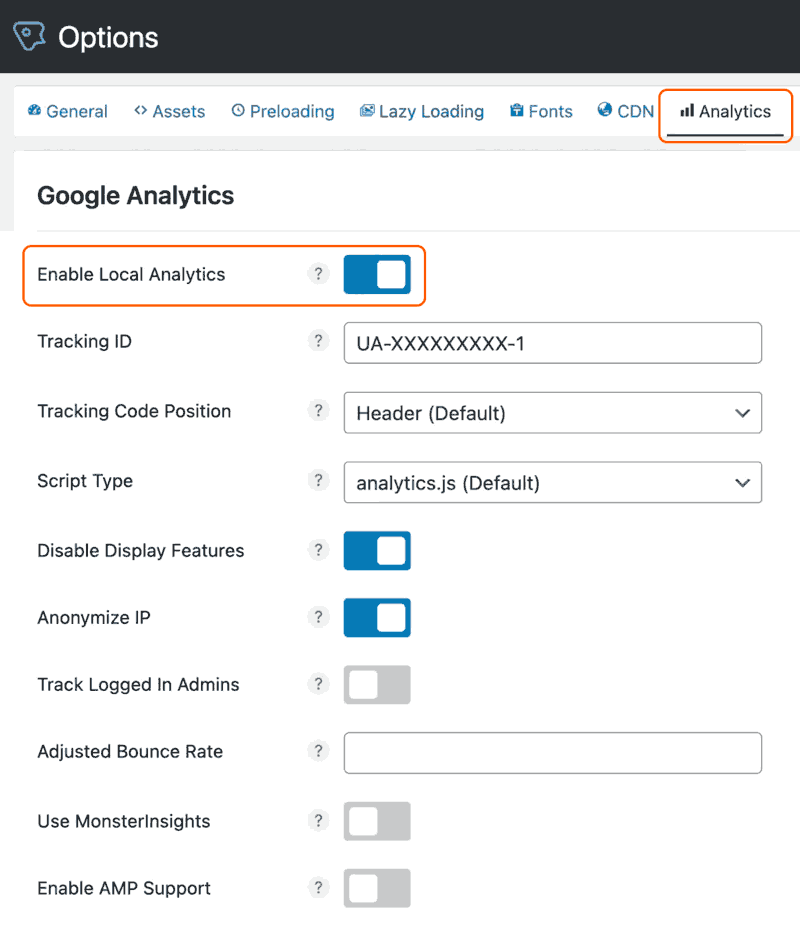
Perfmatters can host the Google Analytics 4 script locally and refresh it automatically with a daily cron job. Current options include the standard GA4 script and a minimal GA4 implementation.
This can reduce third-party DNS work and let the script use your own cache/CDN headers, but there are two important caveats:
- Google does not officially support local hosting of the Analytics script.
- Do not load Analytics twice. If another plugin or theme already injects GA, remove that duplicate implementation first.
For many sites, delaying Analytics until interaction produces a larger initial-performance gain than local hosting alone.
Speculative Loading and faster internal navigation
WordPress 6.8 added Speculative Loading to core using the browser’s Speculation Rules API. By default, WordPress uses a conservative prefetch behavior.
Perfmatters gives you control over that behavior, including prerender mode and eagerness settings. Prerender can make eligible internal navigation feel nearly instant because the browser prepares the destination page before the visitor clicks.
This is a perceived-performance optimization rather than something you will necessarily see in a standard synthetic test. It also consumes more browser CPU and memory than normal prefetching, so more aggressive settings should be tested rather than enabled automatically.
Preload, preconnect and DNS prefetch
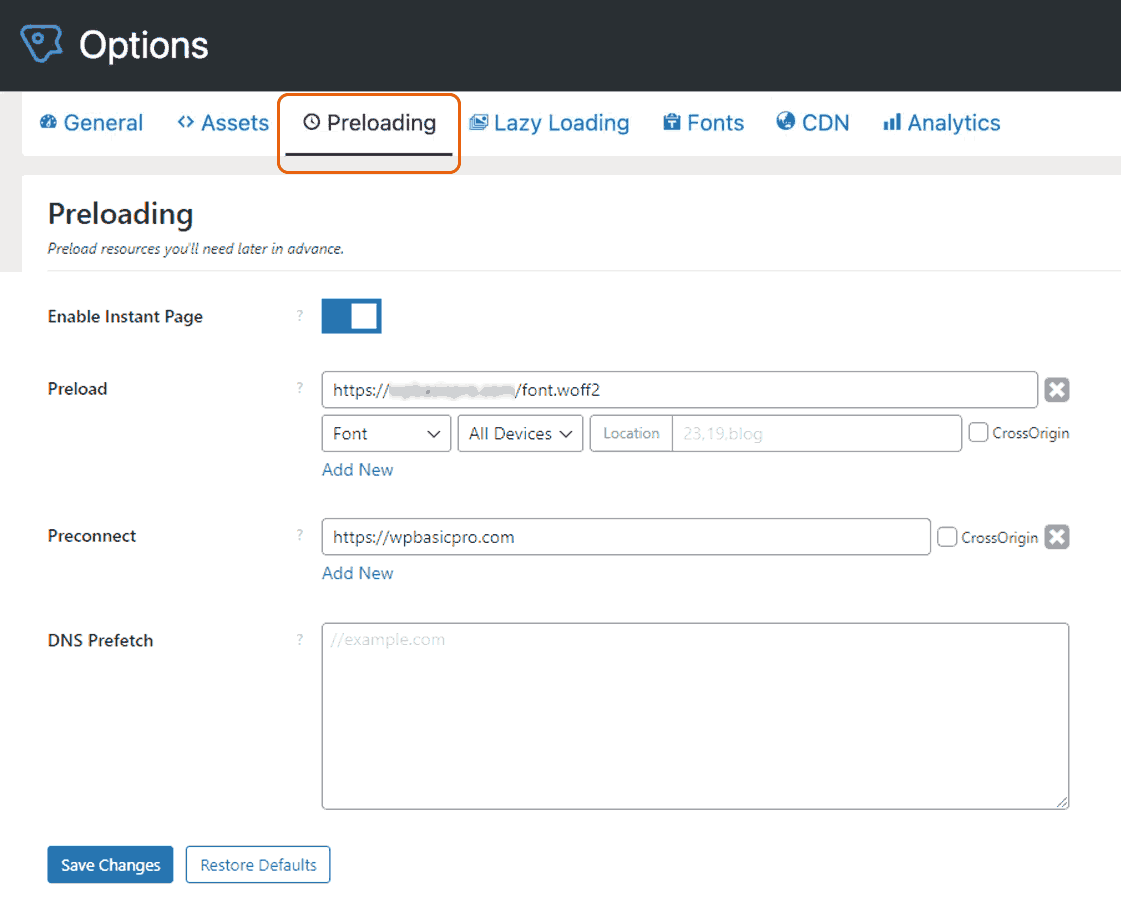
Perfmatters gives granular controls for preloading critical resources, DNS prefetch and preconnect. These can be targeted by page and device.
More preload rules are not automatically better. Preloading resources that are not required immediately can compete with the actual LCP resource and increase Total Blocking Time. Use preload for assets the current page genuinely needs early, such as a hero image or critical font.
Code snippets: a major 2026 addition
Perfmatters now includes a built-in code snippet system for PHP, CSS, JavaScript and HTML. The developers use a flat-file approach so frontend execution does not require database calls.
Snippets can use Perfmatters optimization controls individually, including inline/file output, minification, delay, defer, async and preload behavior. Recent releases also added path-based conditions, shortcode output for HTML snippets and block-editor loading for frontend CSS snippets.
This does not turn Perfmatters into a full cloud snippet manager such as WPCodeBox, but it can replace a separate simple snippets plugin for many performance-focused sites.
Database optimization
Perfmatters can clean revisions, auto-drafts, trashed posts/comments, spam comments and transient data, and it lets you control WordPress revision and autosave behavior.
Cleaning a database can reduce clutter, but it is not accurate to promise that every cleanup will noticeably accelerate the frontend. Database performance problems on large WooCommerce or membership sites can also come from indexes, autoloaded options, slow queries and table design, which require deeper investigation.
Change the WordPress login URL

Perfmatters can change the default /wp-login.php / /wp-admin/ login path. This can reduce automated requests hitting common WordPress login endpoints and may reduce unnecessary bot traffic.
We would treat this as a supplementary measure, not primary authentication security. Strong passwords, two-factor authentication, rate limiting and proper updates are still more important.
Safe Mode
Perfmatters 2.6.8 added a dedicated Safe Mode that temporarily disables the plugin’s performance optimizations sitewide without disabling its security-related options or code snippets.
This is useful when troubleshooting a broken layout, missing script or frontend conflict because you can quickly determine whether a Perfmatters optimization is involved before changing individual settings.
How we would use Perfmatters in a modern WordPress stack
- Use your host/server cache or a dedicated caching plugin for page caching and TTFB.
- Let Perfmatters handle frontend asset optimization such as Script Manager, Delay JS and Remove Unused CSS.
- Use one image optimization workflow instead of stacking overlapping image plugins.
- Avoid duplicate optimizations. Do not enable the same CSS/JS/lazy-load feature in multiple plugins.
- Test ecommerce and interactive pages carefully before applying aggressive delay/remove rules globally.
This modular approach is especially important with LiteSpeed Cache, WP Rocket and similar tools because duplicated optimization features can create conflicts or make troubleshooting much harder.
Perfmatters pricing in 2026
- Personal: $29.95/year for 1 site.
- Business: $59.95/year for 3 sites.
- Unlimited: $124.95/year for unlimited sites, including Multisite support.
All plans include one year of updates and support plus a 30-day money-back guarantee. Perfmatters currently applies a 15% renewal discount. There is still no lifetime license.
Check the official Perfmatters pricing page before purchasing.
Who should use Perfmatters?
Perfmatters makes the most sense for sites where performance problems come from frontend excess rather than just slow hosting: too many globally loaded plugin assets, heavy third-party JavaScript, unused CSS, web fonts, analytics and WooCommerce scripts.
It is particularly useful for developers, agencies and technically involved site owners who are willing to test settings and exclusions rather than enable every optimization switch at once.
If the main problem is a very slow uncached TTFB, insufficient hosting resources or a poorly designed database query, Perfmatters alone will not fix the root cause.
Need help diagnosing WordPress performance rather than guessing at settings? See our WordPress Speed Optimization service. Suitable premium licenses may be included from our available subscriptions when applicable.
Final thoughts
Perfmatters is one of the most useful WordPress optimization tools when you need granular control over frontend code. Its strongest features are Script Manager, Remove Unused CSS, Delay JS and the ability to disable or localize WordPress/plugin behavior without editing theme files.
The 2026 additions make it more complete: Safe Mode improves troubleshooting, code snippets can replace another lightweight utility plugin, and Speculative Loading controls improve internal navigation on supported browsers.
We would not treat Perfmatters as a one-click speed score generator. Used carefully alongside proper caching, good hosting and a lean plugin stack, it is much more valuable: a precise tool for removing work the browser and server did not need to perform in the first place.