
FluentCRM is a self-hosted email marketing and automation platform that runs inside WordPress. It combines contact management, email campaigns, segmentation, automation funnels, sequences, reporting and deep WordPress integrations without moving your CRM database to a separate SaaS platform.
Updated September 2026: FluentCRM is now at version 3.2.0 with more than 80,000 active installations. The product has changed substantially since our original review, adding a rebuilt v3 interface, Gutenberg-native email builder, AI tools, MCP access, SMS and WhatsApp messaging, a unified inbox, frontend CRM access and a much broader automation ecosystem.
FluentCRM in 2026: what changed?
- FluentCRM v3: rebuilt with Vue 3 and Element Plus for a faster, cleaner admin experience.
- Gutenberg-native email builder: reusable email patterns, device previews and modern block-based composing.
- AI tools: AI-assisted email writing and contact summaries.
- MCP for AI agents: compatible AI clients can read CRM data and perform authorized actions through WordPress Application Passwords.
- SMS and WhatsApp: campaigns, automations, direct messaging and a unified inbox are now part of FluentCRM Pro.
- New reports: redesigned dashboards, campaign insights, UTM visibility and richer business reporting.
- Better sending infrastructure: multi-threaded email sending, improved bounce handling and faster campaign starts.
What is FluentCRM?
FluentCRM is different from SaaS tools such as Mailchimp or ActiveCampaign because the CRM application and contact database live inside your WordPress site. Your contacts, tags, lists, email history, automation state and integration data remain under your WordPress installation.
The plugin itself does not become your email-delivery network. FluentCRM sends through WordPress, so for reliable bulk delivery you should connect a dedicated provider such as Amazon SES, Mailgun, SendGrid, Postmark, Brevo, Elastic Email or another supported SMTP/API service.
This separation is important: FluentCRM handles who receives what and when; your email provider handles actual delivery and reputation.
360° contact profiles
Every subscriber has a contact profile containing core contact information plus activity collected from WordPress integrations. Depending on your stack, that profile can include purchases, form submissions, support tickets, LMS activity, bookings, project tasks, tags, lists, notes and email engagement.
This is one of the main advantages of running the CRM inside WordPress: WooCommerce, FluentSupport, FluentBooking, FluentBoards, FluentCommunity and other plugins can contribute data directly without a separate synchronization service.
Lists, tags and dynamic segmentation
FluentCRM supports three main ways to organize contacts:
- Lists for broad groups such as Newsletter Subscribers or Customers.
- Tags for more specific behavioral or lifecycle labels.
- Dynamic Segments that automatically recalculate based on rules.
Pro dynamic segments can use contact data, custom fields, email engagement, WooCommerce purchase history, membership state, LMS activity and other integration data. This is particularly useful for lifecycle marketing because the audience changes automatically as customer behavior changes.
Gutenberg-native email builder
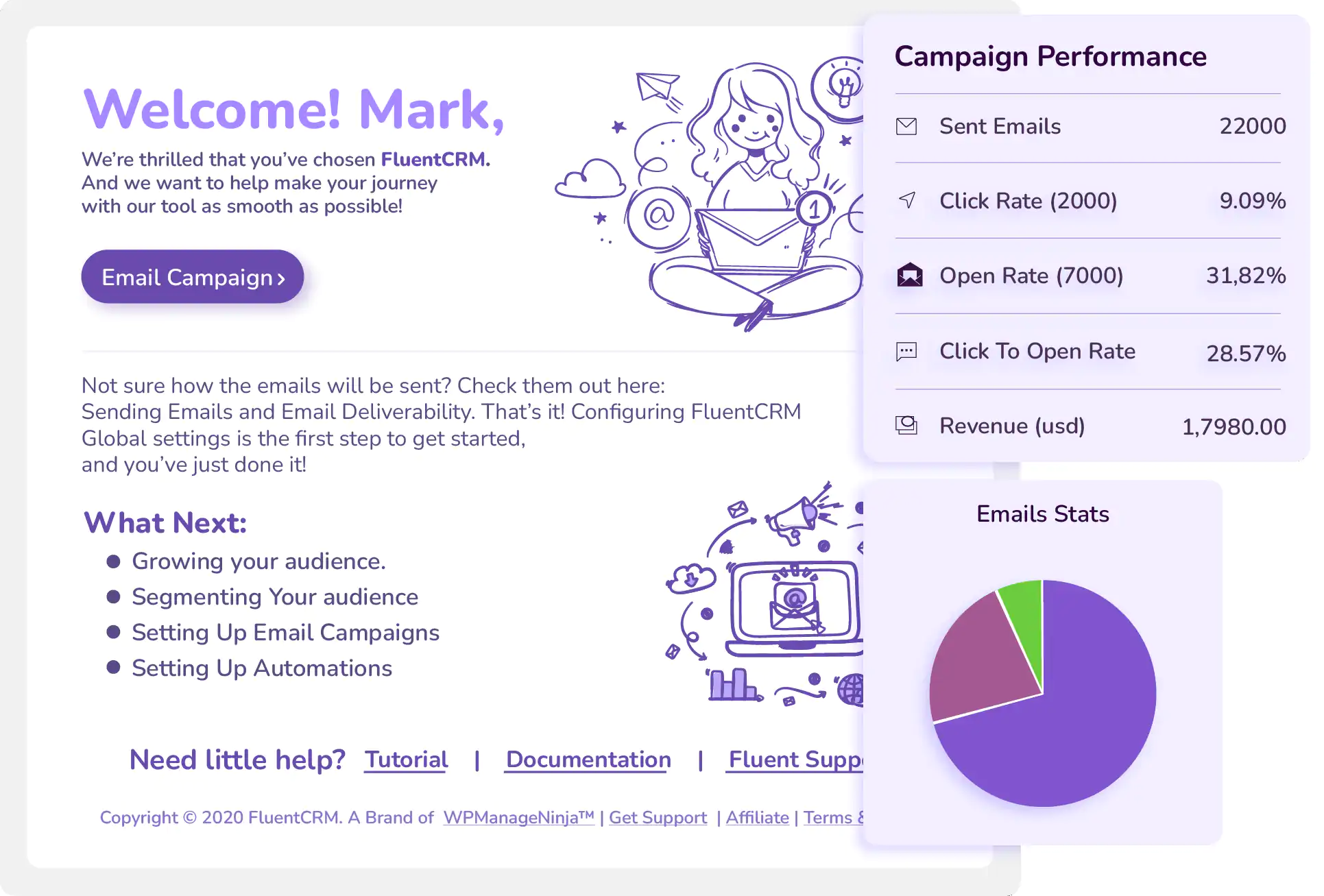
FluentCRM v3 introduced a new email builder based on WordPress-style blocks. It includes reusable email patterns, device preview, media-library support and modern visual composing alongside classic and HTML workflows.
Campaigns can be scheduled, targeted by lists/tags/segments, personalized with SmartCodes and tracked for opens, clicks and UTM activity. Pro adds features such as recurring campaigns, A/B subject testing and more advanced post-campaign actions.
Marketing automation funnels
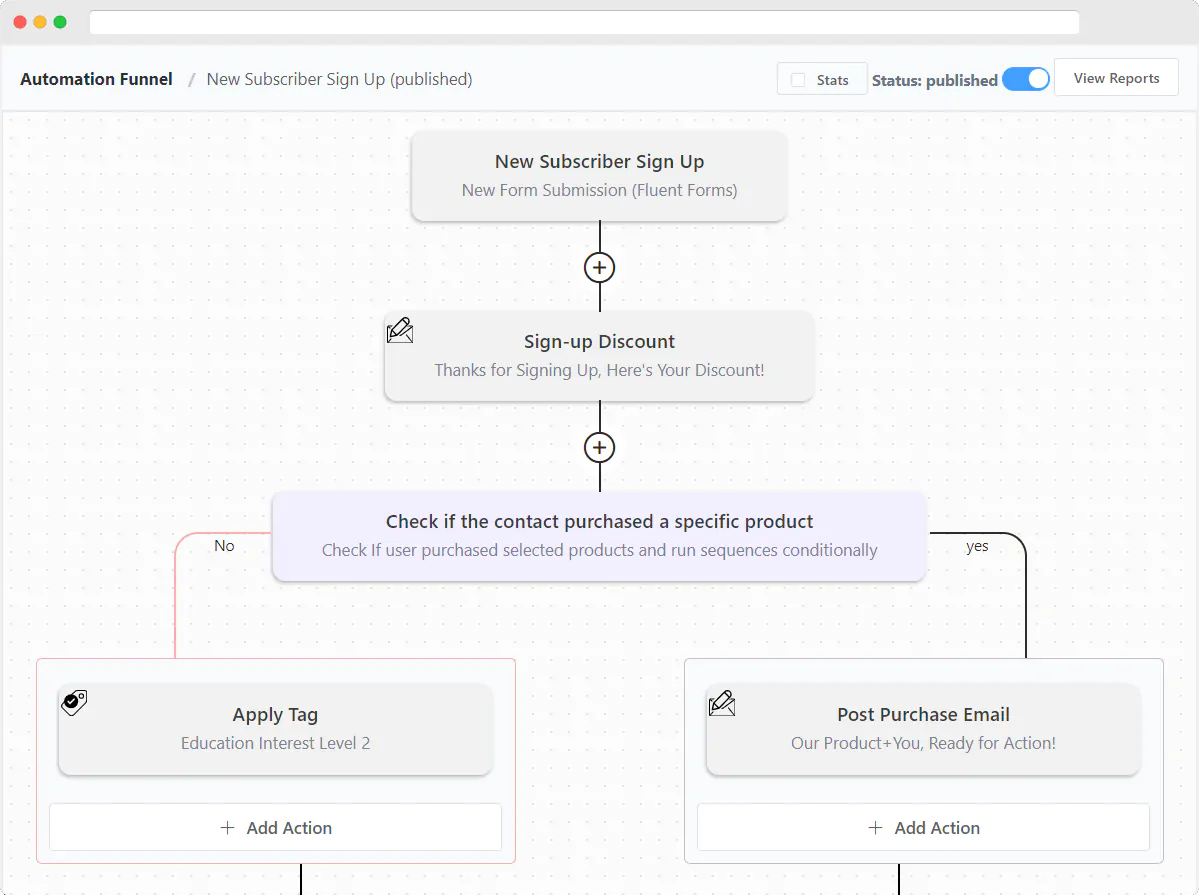
Automations are where FluentCRM becomes more than a newsletter plugin. A funnel begins with a trigger, then moves contacts through actions, waits, conditions and goals.
Triggers can come from FluentCRM itself or from the rest of your WordPress stack: form submissions, WooCommerce orders, abandoned carts, subscription changes, course enrollment/completion, bookings, support activity, community events and more.
Common automation use cases include onboarding, post-purchase follow-ups, cart recovery, course nurturing, renewal reminders, cross-sells, customer win-back sequences and lead qualification.
Email sequences
Email sequences are reusable timed series of emails that can be attached to automations. They are useful when the same follow-up sequence should be triggered from several funnels.
Sequences are a Pro feature. If your use case is a simple welcome email, Free automation may be enough. If you are building lifecycle campaigns with reusable multi-email flows, Pro becomes much more useful.
FluentCRM for WooCommerce
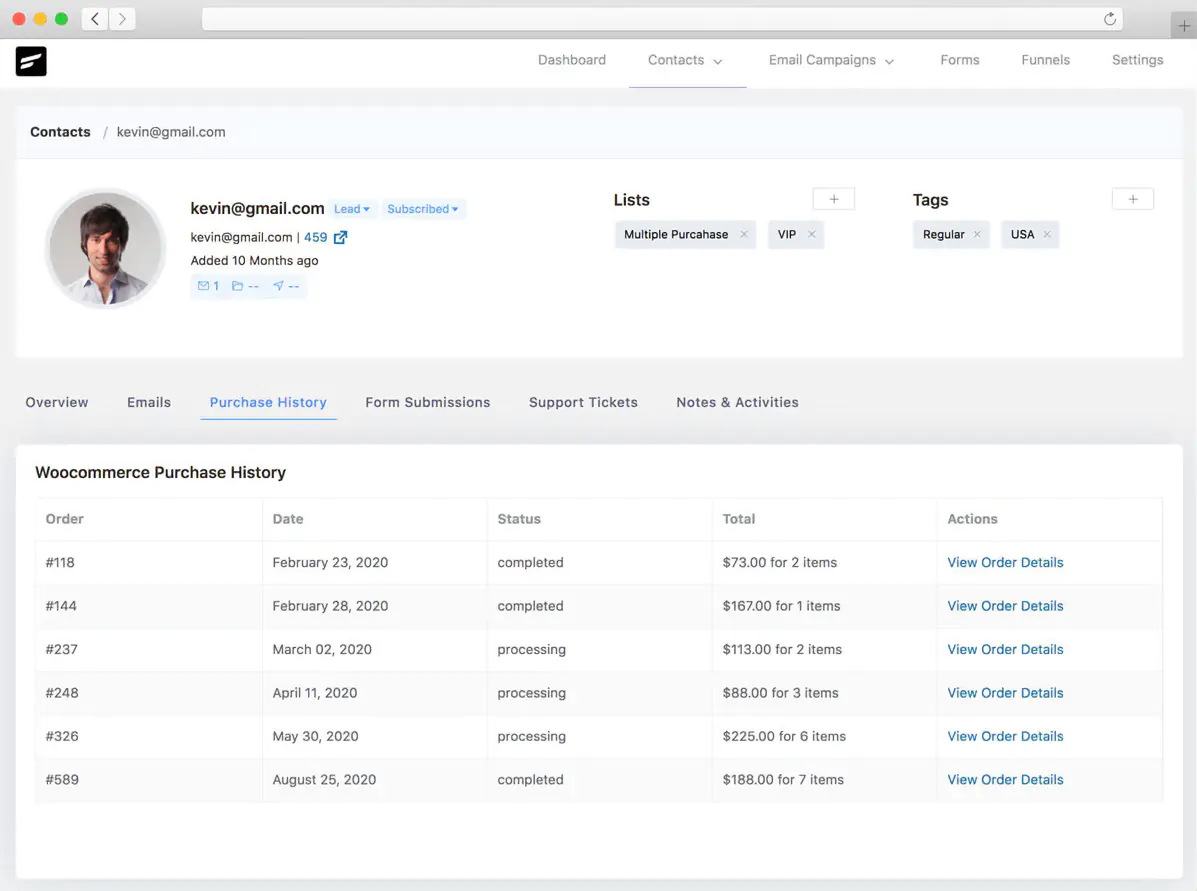
WooCommerce is one of FluentCRM’s strongest integrations. Customer and order data can be added to contact profiles, buyers can be segmented by products or purchase history, and store events can trigger marketing automations.
You can also add an opt-in checkbox at checkout so customers explicitly subscribe to marketing where required. For stores, this is a much better approach than automatically treating every buyer as a marketing subscriber.
Current FluentCRM also supports abandoned-cart workflows and ecommerce reporting. FluentCart integration is particularly deep, but WooCommerce remains a first-class use case.
WordPress integrations
FluentCRM integrates directly with a large WordPress ecosystem. Current integrations include tools across ecommerce, forms, LMS, memberships, community, bookings, support and automation.
- Ecommerce: WooCommerce, Easy Digital Downloads, FluentCart, SureCart.
- Forms: Fluent Forms, Elementor forms and others.
- LMS: LearnDash, LifterLMS, Tutor LMS, LearnPress and Academy LMS.
- Memberships: MemberPress, Paid Memberships Pro, Restrict Content Pro, WishList Member.
- Community/support: FluentCommunity, BuddyBoss, FluentSupport.
- Operations: FluentBooking, FluentBoards, AffiliateWP, Fluent Affiliate.
- External automation: webhooks, Zapier, WP Fusion and automation plugins.
Many integrations load automatically when both plugins are active. Some advanced triggers, actions and integrations require FluentCRM Pro.
SMS and WhatsApp in FluentCRM 3.2
FluentCRM 3.2 expanded the platform beyond email. Pro now includes a unified messaging layer for SMS and WhatsApp with a shared inbox.
- One-to-one SMS and WhatsApp conversations.
- Messaging campaigns.
- WhatsApp templates managed from FluentCRM.
- Reusable SMS templates.
- Inbound messages from people who are not yet CRM contacts.
- WhatsApp images and documents in the inbox.
WhatsApp still requires an external provider such as Meta Cloud API or Twilio; FluentCRM is the campaign, automation and inbox layer, not the messaging carrier itself.
AI writing and contact summaries
FluentCRM v3 added optional AI features. You can connect a supported AI provider and use it for email-writing assistance and contact summaries.
This is useful for drafting or summarizing CRM activity, but it is not required for the core product. The CRM remains fully usable without connecting an external AI provider.
MCP for AI agents
FluentCRM now ships with a built-in Model Context Protocol (MCP) server. Compatible clients such as Claude, Cursor and OpenAI coding clients can connect to FluentCRM through a secure WordPress endpoint.
Depending on the permissions and available tools, an AI client can read contacts, inspect reports, send test campaigns or enroll contacts into automations. Authentication uses WordPress Application Passwords, so access can be revoked from WordPress.
MCP is available in both Free and Pro, although Pro exposes additional capabilities from premium modules.
Email delivery: the part FluentCRM does not replace
Because FluentCRM is self-hosted, it is easy to assume your web server should also send tens of thousands of marketing emails. That is usually a bad idea.
FluentCRM itself recommends a dedicated email delivery provider rather than relying on normal hosting mail. FluentSMTP is the companion delivery plugin, and it can connect through APIs or SMTP to services such as Amazon SES, Mailgun, SendGrid, Postmark, Elastic Email, Brevo and others.
For good deliverability, also configure SPF, DKIM and DMARC correctly and use bounce handling where your provider supports it.
FluentCRM Free vs Pro
The free version is unusually capable. It supports contact management, lists/tags, campaigns, basic automations, reporting and several WordPress integrations without imposing a contact limit.
Pro is where FluentCRM becomes a more complete marketing-automation platform. It adds:
- Advanced and dynamic segmentation.
- Email sequences.
- More automation triggers, actions, goals and conditions.
- A/B subject testing and recurring campaigns.
- Advanced WooCommerce/LMS/membership integrations.
- Smart Links and incoming webhooks.
- CRM manager roles and more advanced reports.
- SMS/WhatsApp messaging and unified inbox.
- White-label/branding removal and other premium workflow features.
FluentCRM pricing in 2026
FluentCRM Pro pricing is based on the number of WordPress sites, not the number of contacts. All paid tiers include the complete Pro feature set.
- Solo/Blogger: $129/year for 1 site.
- Small Business: $249/year for 5 sites.
- Agency: $499/year for 50 sites.
The official site currently advertises a 20% first-year discount, bringing those plans to approximately $103, $199 and $399 respectively. Plans include one year of updates and priority support, and FluentCRM currently advertises a 14-day money-back guarantee.
Remember that your email-delivery provider is a separate cost. FluentCRM does not charge by contact count, but Amazon SES, Mailgun, SendGrid or another delivery service may charge based on sending volume.
Check the official FluentCRM pricing page before purchasing because discounts can change.
FluentCRM strengths
- No contact-based software pricing.
- Deep WordPress-native integration.
- Strong WooCommerce and LMS automation.
- Contact data stays inside your WordPress database.
- Free version is genuinely useful.
- Advanced segmentation and automation in Pro.
- Rapidly expanding messaging and AI workflows.
FluentCRM limitations
- Your WordPress database becomes your CRM database. Large contact/activity datasets need good hosting, backups and database maintenance.
- Email delivery is separate. You still need a reliable sending provider and proper DNS authentication.
- Automation relies on WordPress scheduling/queues. High-volume stores should verify cron reliability and server capacity.
- Some important workflows are Pro-only. Email sequences, advanced segmentation and many integrations/actions require the paid plugin.
- Self-hosting means more responsibility. SaaS platforms abstract away more infrastructure and deliverability management.
Who should use FluentCRM?
FluentCRM is particularly compelling for businesses that already run their customer journey inside WordPress: WooCommerce stores, membership sites, online courses, communities, booking businesses and agencies managing multiple WordPress projects.
It also makes sense for businesses that want to avoid SaaS pricing that grows directly with contact count and are comfortable operating their own WordPress infrastructure.
If you prefer a fully managed marketing platform where contact storage, sending infrastructure and CRM operations are all externalized, a traditional SaaS CRM may be simpler.
Need help maintaining FluentCRM, WooCommerce or your broader WordPress stack? See our WordPress Maintenance service. Suitable premium licenses may be included from our available subscriptions when applicable.
FluentCRM review: final thoughts
FluentCRM has evolved from a WordPress email-marketing plugin into a broader customer-automation platform. Version 3 brought a much better email editor, redesigned reporting, AI capabilities and MCP access, while version 3.2 expanded the platform into SMS and WhatsApp messaging.
Its strongest advantage remains the same: if your customers already interact with WooCommerce, forms, memberships, courses, bookings, support or community plugins inside WordPress, FluentCRM can work with that data directly instead of constantly syncing it to an external CRM.
The trade-off is operational responsibility. You need reliable hosting, a real email-delivery provider, working cron/queues and sensible database maintenance. For businesses comfortable with that model, FluentCRM can provide a remarkably capable CRM and automation stack without contact-based SaaS pricing.