If you want a faster, smoother WordPress site, here are the key strategies to improve performance and reduce load times.
Keep Everything Fully Updated
In our experience, updates are the first and most important step before optimizing any site. It’s common to find websites running outdated plugins or themes, which can not only slow things down but also create serious security risks. Our top priority for keeping any WordPress site fast and secure is ensuring that WordPress itself, all plugins, and the theme are fully up to date — always.
Fewer Plugins, Better Performance
With over 60,000 plugins available, WordPress offers incredible flexibility. However, using too many plugins can strain your site’s resources — not necessarily because of hosting limitations, but simply due to plugin overload.
Before digging into the performance impact of individual plugins, do a quick audit: make sure every active plugin serves a necessary, unique function. If two plugins overlap in functionality, deactivate or remove one.
Use WordPress Site Health Tool
WordPress includes a built-in Site Health tool (found under Tools > Site Health) that can alert you to potential issues, including recommended PHP settings for your hosting environment.
It’s an easy way to identify technical adjustments that could improve both speed and security.
Keep PHP Updated
We recommend using at least PHP version 8.0, and if possible, checking whether your plugins and theme are compatible with PHP 8.2. Our PHP configuration guide explains how to upgrade PHP versions and tweak settings if needed.
If any plugin or theme doesn’t support PHP 8.0, it’s worth considering an alternative — PHP 7.4 has been officially unsupported since November 28, 2022.
The Query Monitor plugin is a great tool for spotting PHP errors. If you see “deprecated” warnings, that means the plugin or theme is using outdated code that could stop working in future PHP versions.
In our experience:
Most well-maintained sites are already compatible with PHP 8.1.
The best-optimized sites support PHP 8.2 — which we recommend as the ideal version.
Very few currently support PHP 8.3 or higher.
Remove PHP Settings from .htaccess
While .htaccess can be used to configure PHP settings, doing so forces PHP to read the file on every request — slightly slowing things down.
To streamline performance, we recommend using CloudLinux’s PHP Selector (available in cPanel) to manage PHP settings directly, without touching .htaccess.
We suggest cleaning up your .htaccess file by removing any custom PHP configurations. Leave only the default WordPress entries and, if applicable, LiteSpeed Cache settings — but no PHP directives.
The use of fonts is absolutely necessary for building a website. While there are several ways to use them, certain methods can result in an unwanted extra loading times for our website.
Below, we’ll explain how and why it’s recommended to load fonts on WordPress sites using Elementor. However, these methods can be useful with other builders, such as the Bricks site builder. By doing this, we can achieve performance improvements of up to 90%.
Let’s get started by using Google Web Fonts as an example, one of the leading font sources today. The steps we follow below don’t necessarily need to be based on fonts from this site.
There are three ways to upload fonts to your website:
Embed the code for your chosen font from Google Web Fonts in your site’s header.
Choose the desired font from the list of available fonts in the builder (e.g., Elementor).
Install your fonts locally.
There are two main reasons why you shouldn’t load fonts using methods 1 and 2 in the list above. The first is that these methods aren’t compatible with Europe’s GDPR (General Data Protection Regulation) because Google collects information from our sites when using their fonts this way. The second reason to be careful with these loading methods is performance. For these reasons, option 3 is recommended. In Elementor, you just need to access the WordPress dashboard and go to “Elementor > Custom Fonts” to load the font you want.
To get the font we want, simply search for the one we like on Google Web Fonts and download it.
When choosing fonts, it’s important to consider that having more than two or three different types of variants isn’t necessary for a website. Furthermore, within each font, there may be many more variants than we actually need.
Let’s take the Lato font, for example. We can see that it has a large number of variants, such as thin, light, regular, bold, and black. It’s unlikely that if our design has a balanced use of fonts, we’ll use all of its variants. For example, if we’ve used Lato in its Regular and Bold versions, we’ll only need to download and install those files. Installing all the others would put an extra load on our website, so we recommend loading a maximum of five types.
Once the fonts have been downloaded, there are some considerations to keep in mind to ensure our website’s performance.
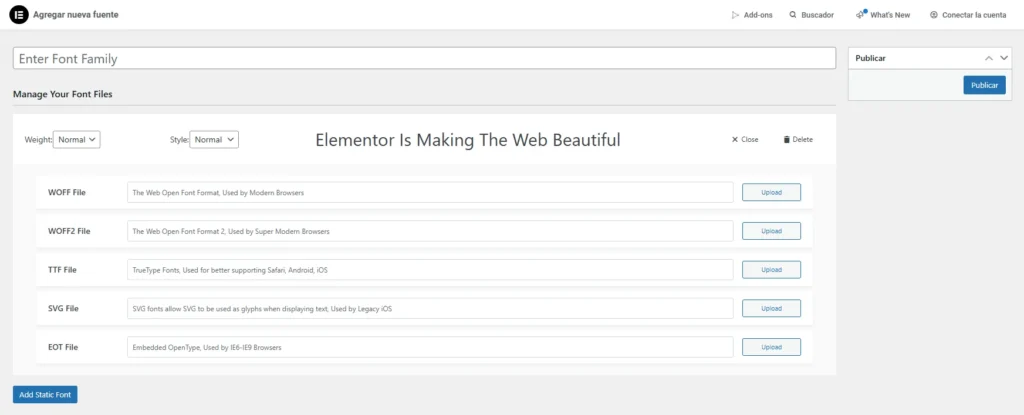
As we see in the image above, Elementor will allow us to upload fonts in up to 5 different formats, but each of them has a different implication, and this is where we need to pay attention.
EOT (Embedded OpenType)
This is a font format created to be embedded in web pages, primarily for older versions of Internet Explorer (IE 6-8). Because these are such old browsers, they’re likely not useful for much of your traffic, so it doesn’t make sense to sacrifice performance with this format.
SVG (Scalable Vector Graphics)
The SVG format isn’t dedicated to fonts, but rather to icons and glyphs. A useful example of this format would be “fontawesome,” an icon library, but its use is still unusual. Fonts in this format can be cumbersome and thus affect website performance.
TTF (TrueType Font)
This is a classic, old-school format that has been used for a long time. Its advantage is that it’s well supported and most devices can render it without issue. Its main problem is its size. It’s precisely for this reason that the formats listed below were developed.
WOFF (Web Open Font Format)
This format was Google’s solution to reducing the size of TTF files, resulting in better performance. All modern browsers, some older ones, and even Android support this format.
WOFF 2 (Web Open Font Format 2)
While similar to the aforementioned format, this one offers better compression quality, which will undoubtedly impact the performance and loading times of the website where it is used. The limitation of this format is that it is not supported by as many devices/browsers as its predecessor.
Now that we understand the characteristics of these different formats, which ones should we choose?
We consider both formats, WOFF and WOFF2, to be ideal. WOFF2 is used because of its lightweight nature, and WOFF serves as a backup in case the user’s browser doesn’t support the former.
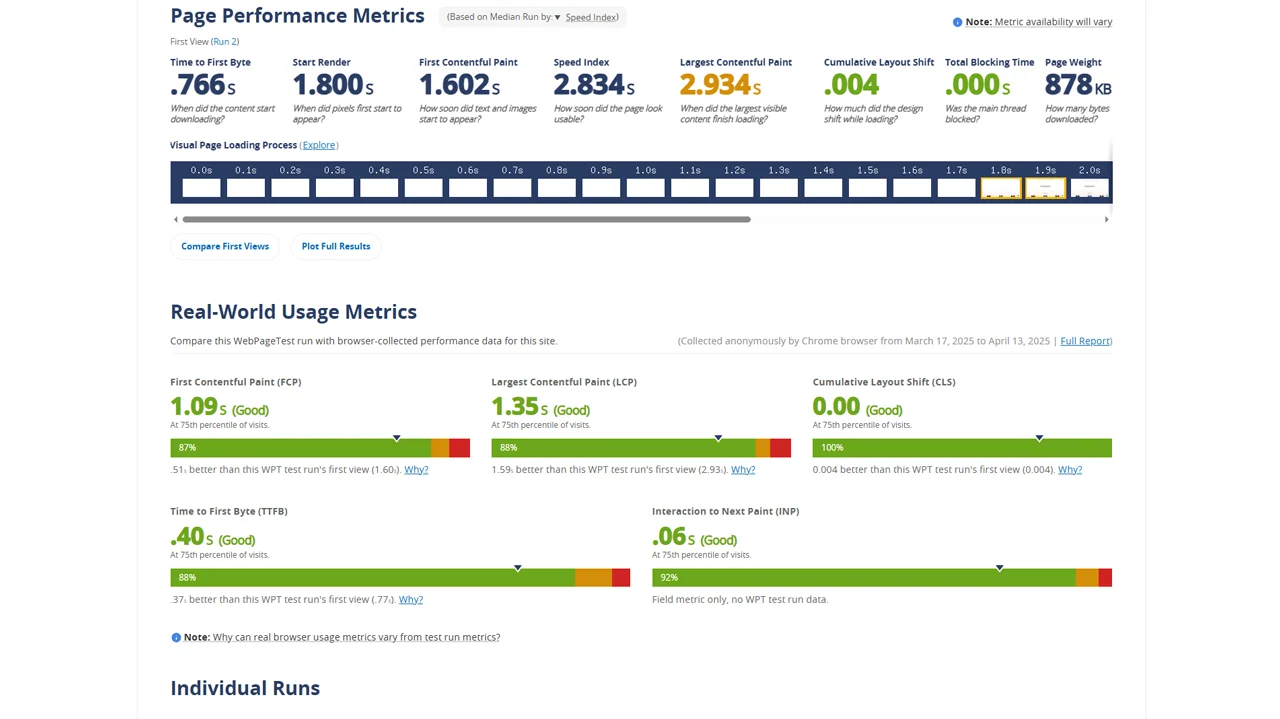
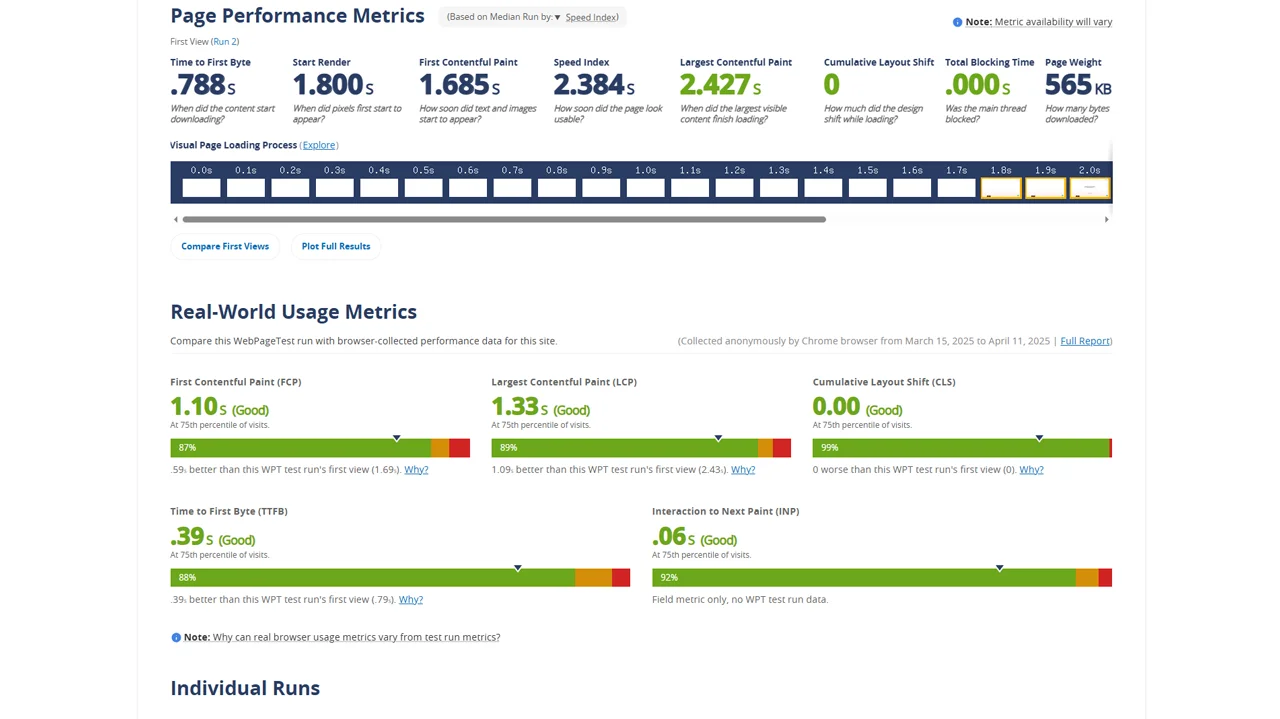
Below, we share the contrast between a site with fonts in TTF and WOFF formats. In the first case, the page weight is 878kb, while in the second, with fonts optimized for performance, the site weight drops to 565kb, a more than considerable difference.
When converting TTF files downloaded from Google Web Fonts, we recommend using the Font Squirrell font generator with the following settings. If you encounter any issues with this converter, you can search for other converters online that offer fewer options but are easier to use.
WooCommerce is a plugin that enables us to convert our WordPress website into an online store. However, it’s common to encounter heavy, slow-loading sites that demand effort and investment to regain the agility and speed necessary for optimal performance.
In addition to general recommendations for improving WordPress loading speed, here are some specific tips to speed up your WooCommerce store.
Deactivate Geolocation
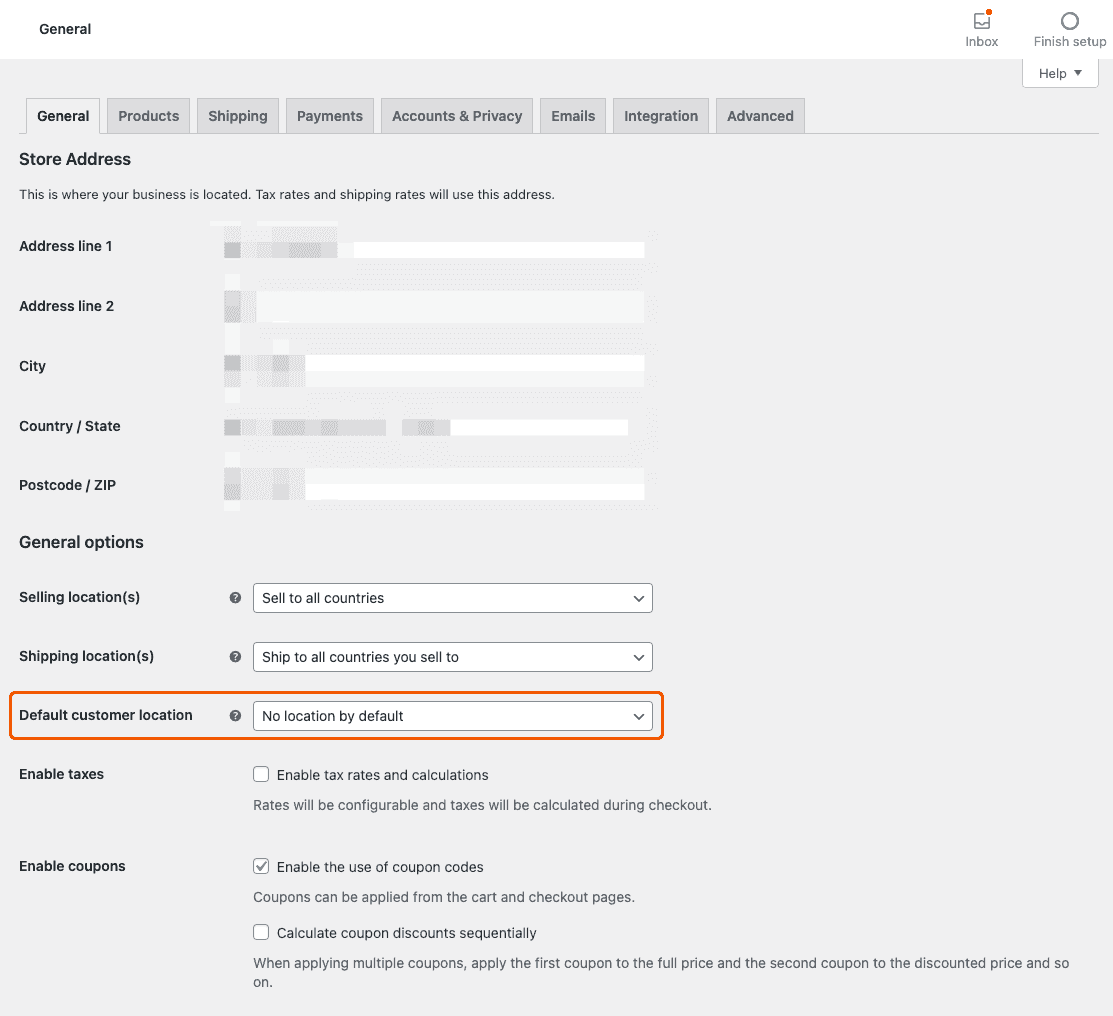
WooCommerce enables us to identify visitors’ countries to automatically display the correct country at checkout. However, if we only sell to a single country, this feature may be irrelevant. Even if we do sell to multiple countries, it’s often convenient to set the most common country as the default option and disable geolocation.
To achieve this, navigate to WooCommerce → Settings, and under the “General” tab, locate the “Default customer location” option. From there, select the country or region of your store.
Optimized databases
WooCommerce generates a significant number of MySQL queries, making it crucial to maintain a healthy database.
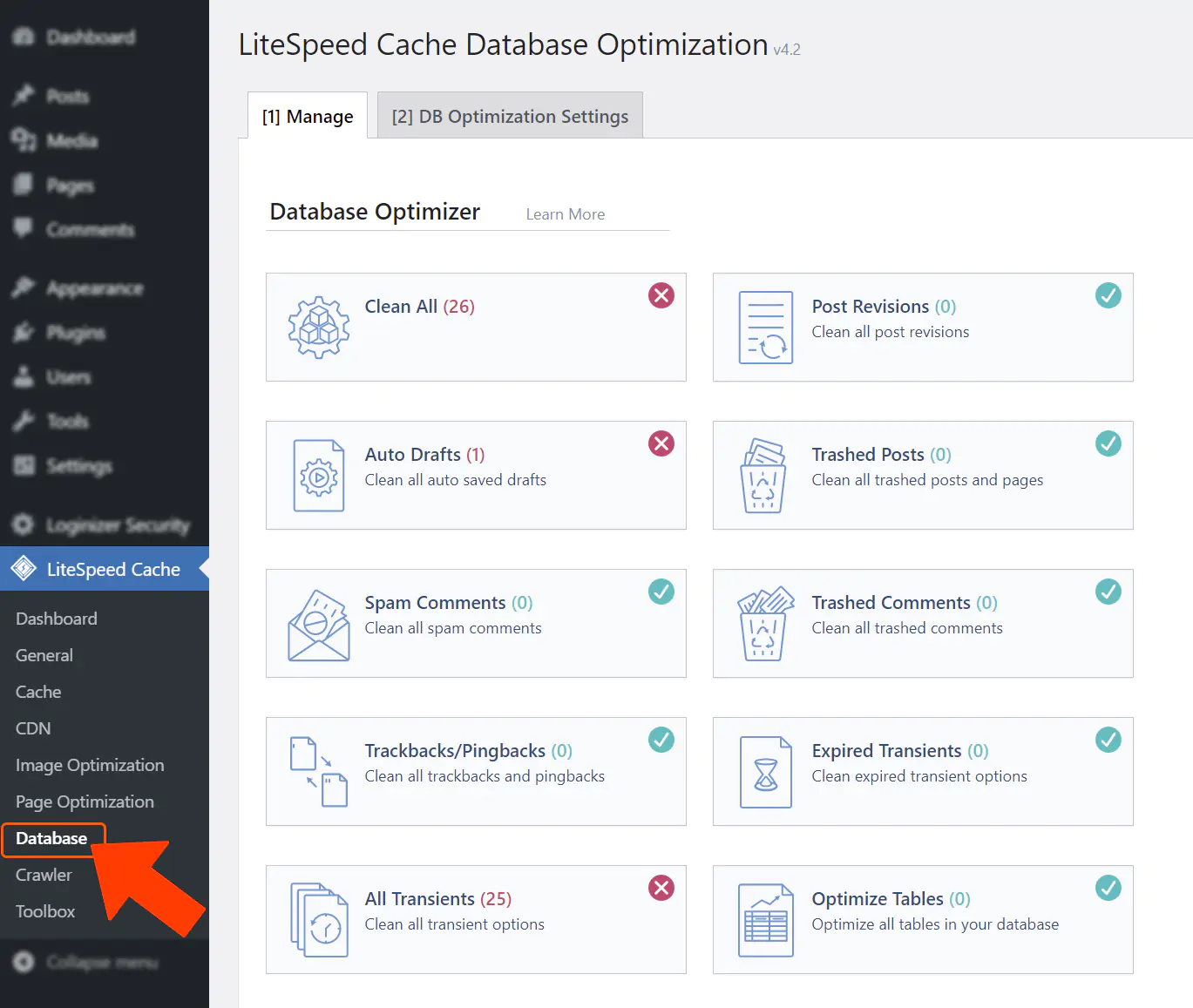
By utilizing the plugin we always recommend, LiteSpeed Cache, you can optimize your database through the following steps within the Database options:
Erase all expired transient data.
Optimize the tables.
Convert all MyISAM tables to InnoDB from the “Database Table Engine Converter”.
These are the only three actions we recommend. The remaining options will depend on each specific case.
Enable WooCommerce HPOS
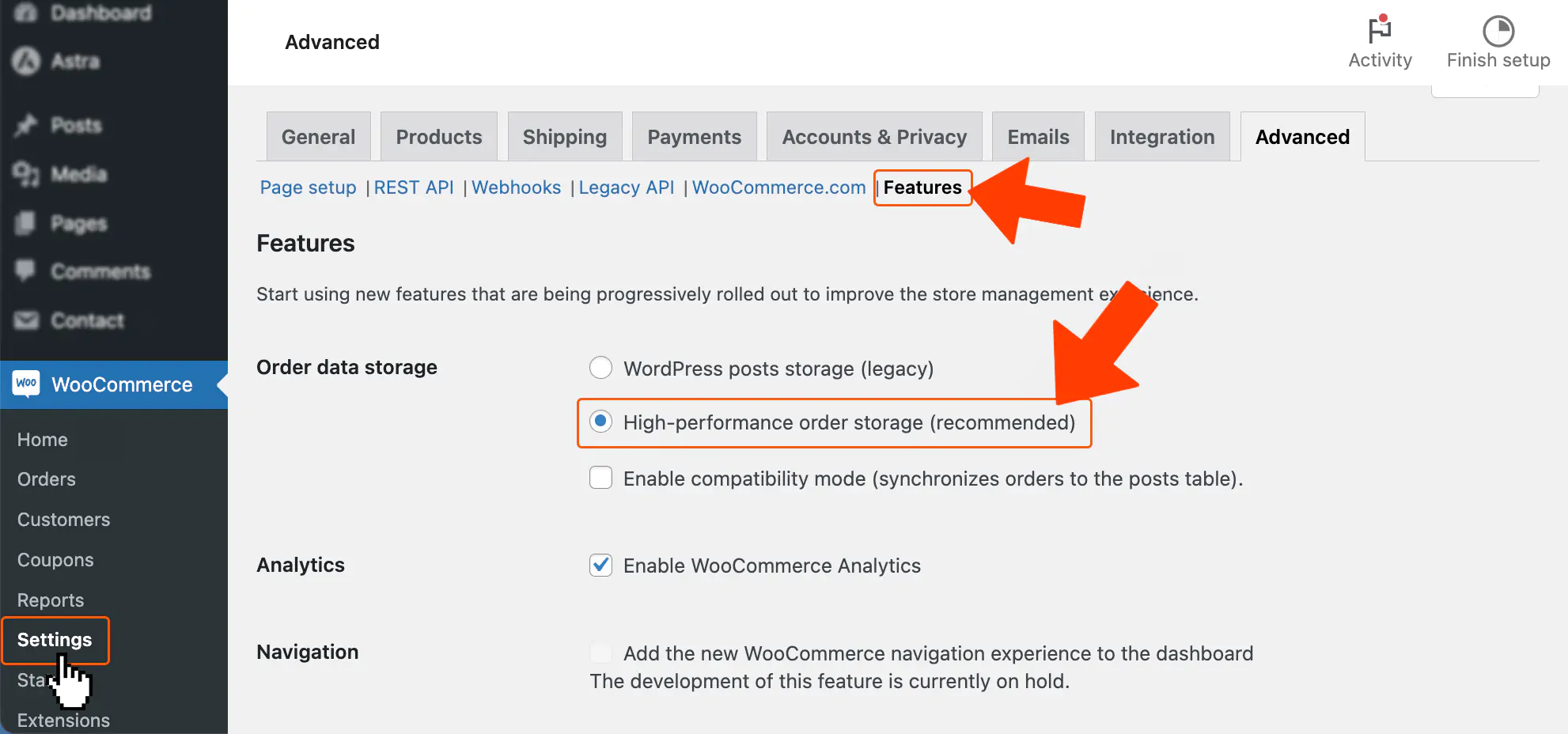
“WooCommerce High-Performance Order Storage (HPOS)” is a feature first introduced by WooCommerce in version 7.1 and now included by default in newer versions. HPOS enables the creation of dedicated tables optimized specifically for WooCommerce, as opposed to using the default table format that WordPress uses for articles and pages.
You can manually enable HPOS in WooCommerce by navigating to WooCommerce → Settings, then selecting the Advanced tab and locating the Features section.
It’s possible that some plugins installed may not be compatible with HPOS yet. In such cases, the incompatible plugins will be highlighted, allowing you to update them or choose replacements that are compatible with the new table format.
MySQL indexes
If you have a large number of products, articles, or users, having indexes for MySQL can significantly speed up navigation within your administrator dashboard.
Index WP MySQL for Speed is an excellent plugin that simplifies the task of indexing MySQL for improved performance. Don’t forget to create a backup before making any changes.
Thank you for reading. We invite you to share your thoughts and impressions in the comments section below.
Gutenberg, FSE, and WordPress blocks are undoubtedly enduring features of website development. The shift? Complex customizations laden with code are being supplanted by a focus on simplicity and speed. In this review, we will outline the 10 fastest FSE themes of 2025, along with recommendations for WooCommerce integration.
The significance of site loading and response speed cannot be overstated. It not only influences the user’s browsing experience significantly but also plays a crucial role in conversions. Furthermore, a swift-loading website is imperative for achieving favorable rankings in Google search results.
While numerous variables contribute to website speed, this summary focuses on presenting ten of the fastest WordPress themes compatible with Gutenberg. Each of these themes boasts hyper-optimized code and is highly customizable to suit any niche, thanks to block editors and the WordPress Customizer. It’s important to highlight that the speed of these ten themes was measured using PageSpeed and YSlow on a clean install. Let’s dive in.
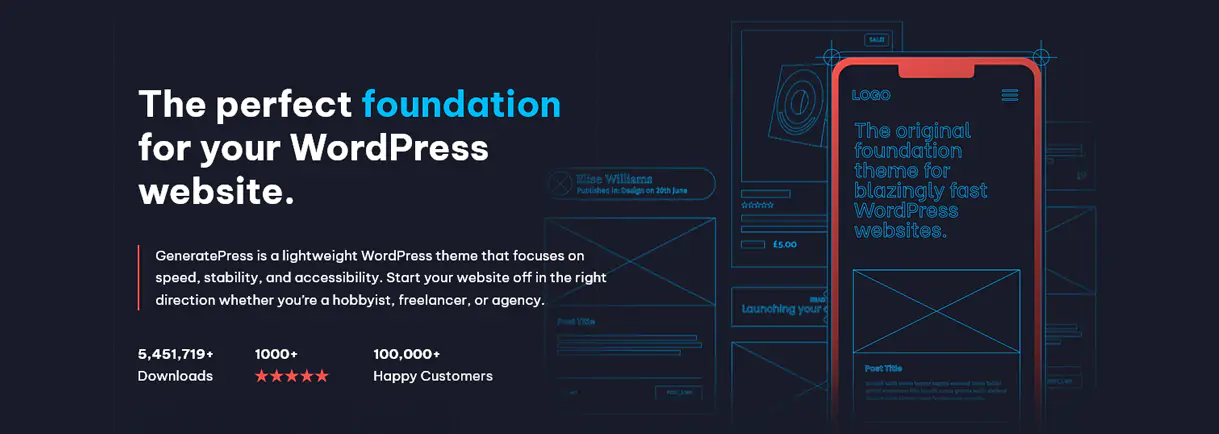
1. GeneratePress
GeneratePress boasts itself as one of the fastest, lightest, and most accessible WordPress themes. Its adherence to high coding standards ensures stability and security. Moreover, its SEO-friendly interface enables it to stand out in Google search results right out of the box, enhancing search engine rankings even before content is added.
GeneratePress offers advanced options, allowing users to customize all design elements, install demo sites, and more. Additionally, it seamlessly integrates with Elementor, providing users with flexibility and versatility in design and layout customization.
GeneratePress isn’t just 100% compatible with Gutenberg; it’s the first theme in history to integrate theme builder functionality directly into the block editor. This achievement is significant.
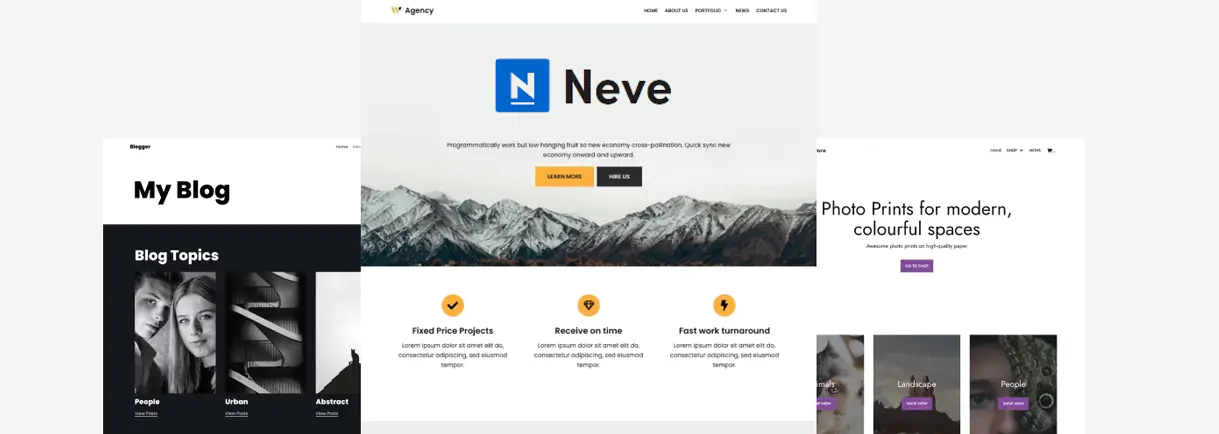
2. Neve
Just like a master summit ski instructor, the ultra-fast Neve theme consumes minimal server resources. Optimized for mobile devices, it offers top-notch mobile responsiveness and SEO positioning for smaller displays. Neve comes with preconfigured layouts out of the box, yet also allows fine customization of elements to tailor your website precisely to your needs.
Neve is compatible with all popular page builders, including Gutenberg, making content creation and modification a breeze. Its flexibility and ease of use ensure a seamless experience without any clumsiness or difficulties. Whether you’re a demanding developer or a web beginner, Neve is a versatile solution suitable for large sites and various skill levels.
3. Astra
Astra continues to remain in force through perpetual improvement and constant optimization. If you have never heard of this Theme, abandon the box where you live because it has been the number one WordPress Theme for years.
It is optimized for performance by removing jQuery dependencies, which in general are the main source of delays. It also allows us to choose individual modules depending on the need for our content, which keeps at bay any line of code we’ll never need.
Astra comes equipped with a real-time customizer, meaning that we can see the changes we make to the site as they will appear on the front-end (i.e., publicly). It is integrated with popular page builders such as Elementor and Beaver Builder. It is also packed with an extensive library of demos and numerous customizable elements, including header and sidebar layout options.
Astra is an excellent complement to Gutenberg since the latter, while claiming unparalleled simplicity and speed, suffers from certain customization limitations. For example, Astra allows the design of structural parts, such as the header and footer, but also of everything else.
On the other hand, Astra is one of the recommended themes for WooCommerce.
This means that, in addition to providing us with templates to quickly create a store, it is optimized to be lightweight and agile with dynamic content while allowing us to fine-tune all the details of our Woo store.
If we do not want to cross Gutenberg with a theme that brings building tools, then perhaps it is not the right choice.
4. Zakra
Zakra is a versatile theme recommended for online stores, especially WooCommerce.
Like all the other themes here, its speed is well optimized, maximizing the chances of conversion (read “selling more”). It is also fully responsive according to the size of the current display, to the point that it is AMP ready. This translates into unbeatable visibility on any type of device.
Zakra’s developers provide us with multiple demos for their Theme, including several eCommerce Home templates. These pre-built templates incorporate 100% Gutenberg layouts. In addition, Zakra integrates seamlessly with Elementor, so it also lets us fully customize our content.
5. SeedProd
SeedProd is a new WordPress Theme builder on the market. Therefore, more than a Theme is every Theme you want. Thanks to the templates that come out of the box, we can have a site designed in minutes.
It is compatible with the Gutenberg block editor and, therefore, comes equipped with custom blocks for our WooCommerce store.
SeedProd website builder is a more advanced and beginner-friendly solution. It clearly allows design without the need to know programming, putting at our fingertips visual customization tools with fields and selections. Thanks to its drag-and-drop facility, anyone new to web development can intuitively create their own designs.
6. Mesmerize
Mesmerize is another versatile, lightweight and flexible theme. It is among the best free WordPress Themes. It allows intuitive drag-and-drop edition, thus creating different content blocks that are stackable, editable, modifiable, and erasable at will. It comes out of the box with several starter templates for quick layouts, including headers and a wide selection of customizable content blocks.
Mesmerize allows us to add modern effects, such as video backgrounds, without affecting the loading speed of our website.
Mesmerize is 100% responsive, so the presentation of our content on mobile devices will look perfect.
This theme is one of the ones recommended for WooCommerce stores. In fact, it offers several specific templates to make our store look spectacular without us getting to personify it with a magnifying glass in hand.
7. X Theme
The blatant Theme X comes out with a design impressive enough to have attracted a horde of users in no time. Here we again have a drag-and-drop builder, which makes it easy to design without us having to type in code, let alone enter the Matrix. X includes a template manager, a selection of content blocks, and complete demos to further customize our website.
This theme is accompanied by several premium plugins, including the legendary Slider Revolution (we cannot install everything that seems useless). It is also retina-ready (high-resolution displays) and fully responsive on cell phones and tablets.
X is compatible with WooCommerce, so it is versatile enough to set up any type of business.
Once we have adjusted some of its features, we will easily get the important metrics to pass any speed test, achieving the minimum page load time. Although it is not the theme that gets more juice out of Gutenberg, it is understood that such a product is a faithful complement since it fills us with possibilities that are impossible in Gutenberg. The boom of this theme in the community is such that it was impossible that X did not have an important place in this list.
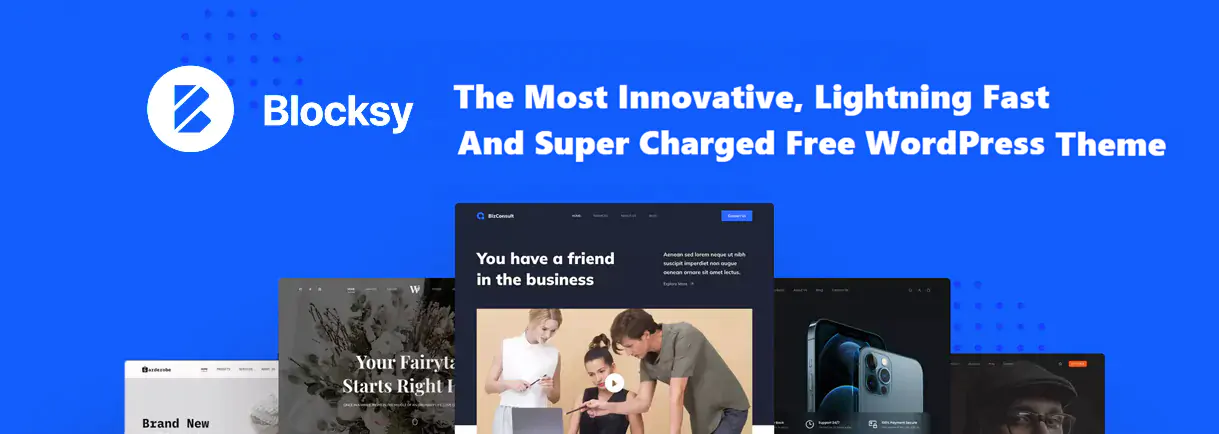
8. Blocksy
Blocksy, as its name “coyly suggests”, was born to reinvigorate Gutenberg blocks. Fast, convenient, and versatile, it lets us design our website with, yes, again, drag-and-drop functionality. However, it is generous in the sense that it is compatible with Elementor and other popular builders. Blocksy makes it easy to customize specific features of our website with numerous color and layout options.
Blocksy integrates seamlessly with WooCommerce, making it an excellent choice for online stores.
It is a highly “SEO-friendly” Theme: responsive with an optimized design, our content will adjust to any size and type of mobile screen. Everything is to convert more and better.
9. OceanWP
OceanWP rides the wave of over 220 WordPress templates ready for Gutenberg and Elementor. We can also, of course, build our own site from scratch if we’re cool.
Like Astra, OceanWP enables on/off settings for individual modules, so we will only increase the load when we really need an element. Everything that doesn’t work for us is out. In addition, it comes out of the oven with very useful extensions to further increase the functionality of our site.
This theme includes an excellent integration of WooCommerce, making it an exquisite and very light option for those who sell or want to sell online.
OceanWP, how could it be otherwise? is optimized for SEO and is fully responsive.
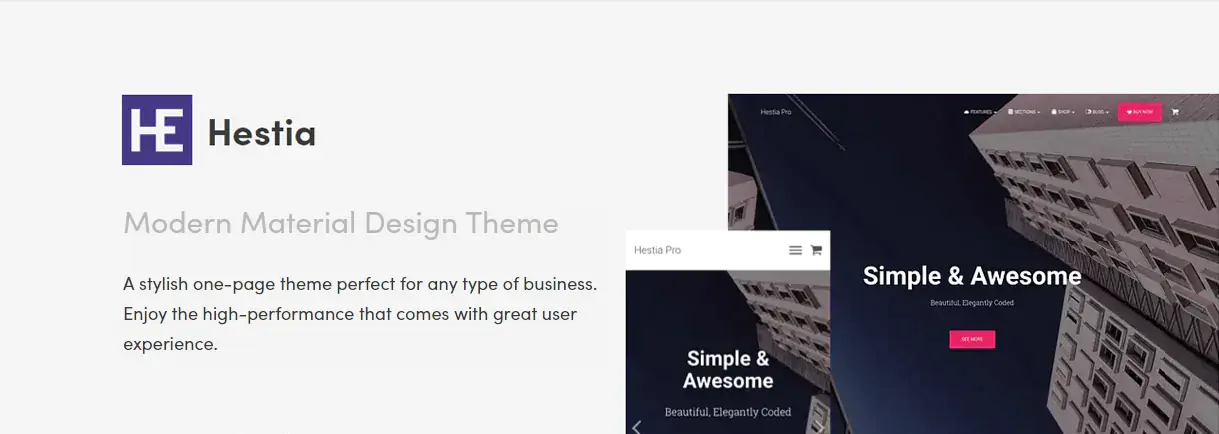
10. Hestia
Hestia is a theme designed to quickly resolve the main sections of our site. For example, we can modify the home page or the blog directly from the customizer. It is very flexible and suitable for minimalist or complex pages. Hestia is 100% Gutenberg-ready.
This elegant Theme uses the principles of Google’s Material Design. It boasts simplicity while excelling in flexibility and intuitiveness. The live customizer makes it suitable for beginners and advanced designers alike.
In addition to Gutenberg, this agile WordPress theme is compatible with block editors like Elementor, Beaver Builder, Visual Composer, and Divi.
Hestia’s lightweight structure makes it an exceptional WooCommerce plugin.
Moreover, it is SEO-ready, so optimization for organic search results is guaranteed.
Conclusions
We’ve showcased ten of the fastest WordPress themes, all thoroughly tested. While your preference may vary depending on your design, marketing, or business requirements, these themes are all excellent choices and are highly recommended for WordPress in 2025.
Let’s not forget that to create a WordPress site that loads quickly, having a fast theme is just one piece of the puzzle. Ideally, you should also opt for a hosting service that is specifically optimized for WordPress, offering high performance and ample hardware resources. Therefore, we encourage you to explore our hosting plans or contact us for tailored advice that fits your projects. Additionally, feel free to share any questions or concerns in the comments section below.
Good luck with your endeavors, and thank you for reading!